
Get the job done with a pro
From training to full-service marketing, our community of partners can help you make things happen.

Let's connect your marketing and your money
QuickBooks makes managing your finances easy and integrates with Mailchimp, allowing you to use your paid invoices to create smarter, more personalized marketing campaigns.
Connect or Disconnect Facebook
Connect Facebook with Mailchimp to post to your timeline from Mailchimp. If you've added an Instagram account to your Facebook Page, you can also access your Instagram photos in our content studio and post to your feed.
In this article, you'll learn how to connect or disconnect Facebook from your Mailchimp account.
Before you start
Here are some things to know before you begin this process.
- This integration syncs your Facebook and Instagram accounts with Mailchimp. To manage customer data between your Mailchimp audience and your Meta Custom Audience, connect the Meta Business Extension to your Mailchimp account.
- To access the features of this integration, you’ll need an active Facebook account that is an admin of at least one Facebook Page. This integration doesn’t post to your personal Facebook profile. Learn more about Facebook Pages.
- When you set up the integration, you must approve each of Facebook’s permission requests. To change the permissions, first disconnect, then reconnect the integration.
- To use Instagram with Mailchimp, you’ll need to add an Instagram business account to your Facebook Page. To learn how, check out Add an Instagram Account to Your Facebook Page.
- If you have trouble with your Facebook connection, check out our guide to troubleshooting the Facebook integration.
- We recommend you connect your Facebook account to 1 Mailchimp account only. When you connect your Facebook account with multiple Mailchimp accounts, it can cause issues with audience management and tracking. This connection doesn't include Lead ads.
Connect Facebook
To integrate Facebook with your Mailchimp account, follow these steps.
- Navigate to the Facebook integration detail page and click Connect.
- If prompted, enter your Facebook credentials and log in.
- Mailchimp will request access to your name and profile picture. Click Continue.
Next, choose which of Facebook's permissions you will allow Mailchimp to access, then click Continue.
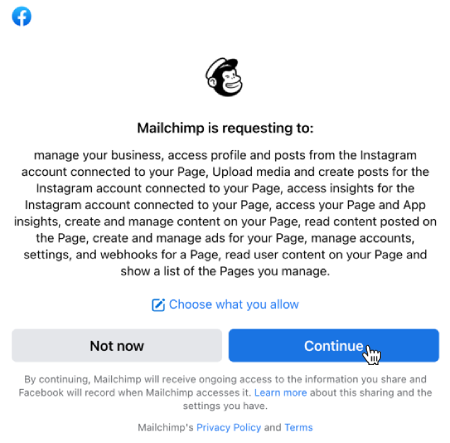
You must approve each of Facebook’s permission requests to use the integration.
Nice work! You’ve successfully connected your Mailchimp account with Facebook.
Next steps
After you connect Facebook to Mailchimp, you can post to your feed and more!
Here are some other resources to help you make the most of the integration.
Users with the Mailchimp Standard plan or higher can schedule a social post to be sent at a later time. To change your plan type, visit the plans page in your account.
Disconnect Facebook
To disconnect the Facebook integration, you'll first disconnect it in your Mailchimp account, then remove it from your Facebook account.
Disconnect in Mailchimp
To disconnect Facebook from your Mailchimp account, follow these steps.
- Click Integrations, and then choose Manage.
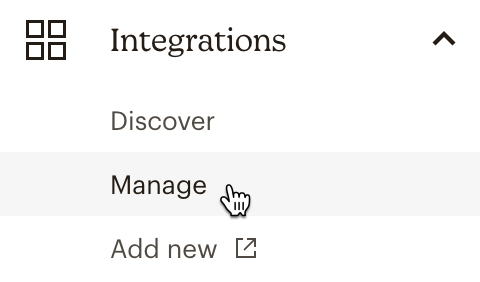
- Click the Facebook tile to open the integration settings.
- Click Disconnect to remove the application from Mailchimp.
After you've disconnected the integration in Mailchimp, you'll need to disconnect it in your Facebook account. You can reconnect Facebook with your Mailchimp account at any time.
Disconnect in Facebook
To remove Mailchimp from your Facebook account, follow these steps.
- Log in to your Facebook account.
- Click the Account icon in the upper-right corner of the screen
- Choose Settings & privacy, then choose Settings.
- In the left navigation panel, click Business Integrations.
- Locate the Active tab, then click Remove next to Mailchimp.

- In the pop-up modal, click Remove to confirm that you want to remove Mailchimp from your Facebook account.

That’s it! Facebook will display a confirmation modal when you’ve completely disconnected Mailchimp from your Facebook account.
Technical Support

Have a question?
Paid users can log in to access email and chat support.